Lock Style with a Reference
Use one reference image to guide new generations.
You will build one style reference image feeding a prompt that produces a matching look.
What you need
- An image on the canvas, either generated or imported from your vault.
- An image model that supports reference input.
Steps
- Place a reference image on the canvas as a file card.
- Create a text prompt beside it.
- Draw an arrow from the image into the text prompt. Only arrows pointing into the prompt count as input. See References.
- Write what to create while keeping the reference style:
- Select the text prompt, not the image.
- Click Generate image.
- In the generate bar, the mode may show Ref Image or Ref Image → Image depending on the model.
- Click Run.
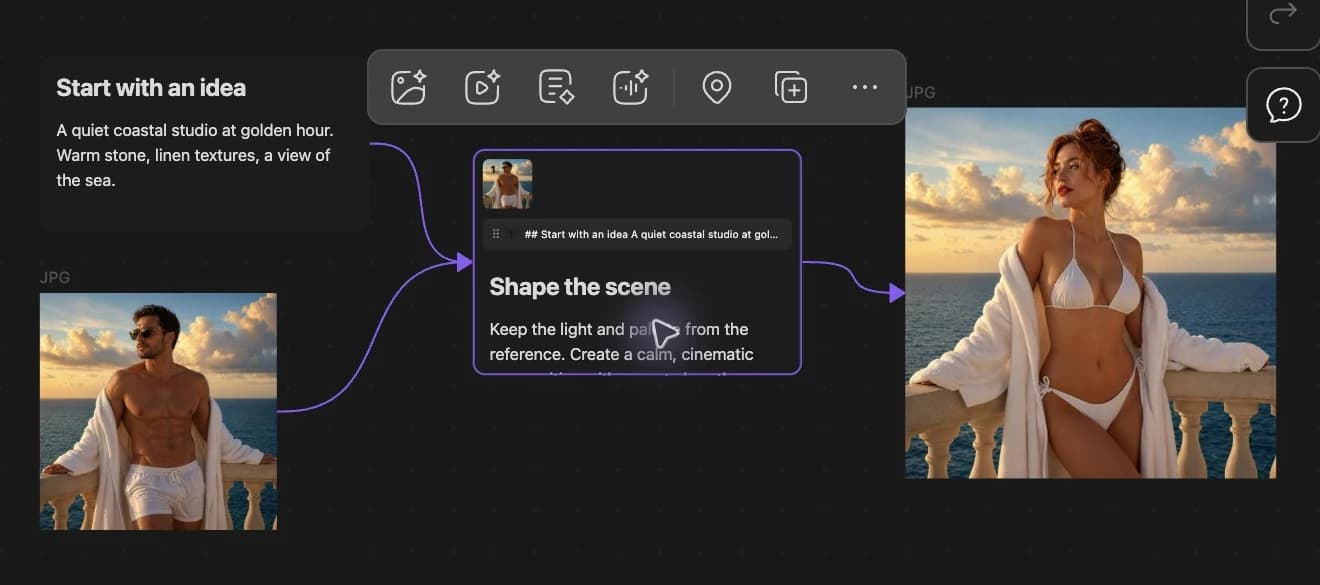
What you should see
- A thumbnail of the reference image on the prompt node.
- A new image card influenced by the reference style.
Stuck?
If the result ignores your reference, see Reference Ignored.
Next step
Continue to Animate Your Best Frame.