Canvas Basics
Toolbar, generate bar, placeholders, and where results land.
This page covers the core canvas interaction: selecting nodes, opening the generate bar, and reading results.
Selecting nodes
Click a card on the canvas. Bragi injects buttons into Obsidian's floating canvas menu.
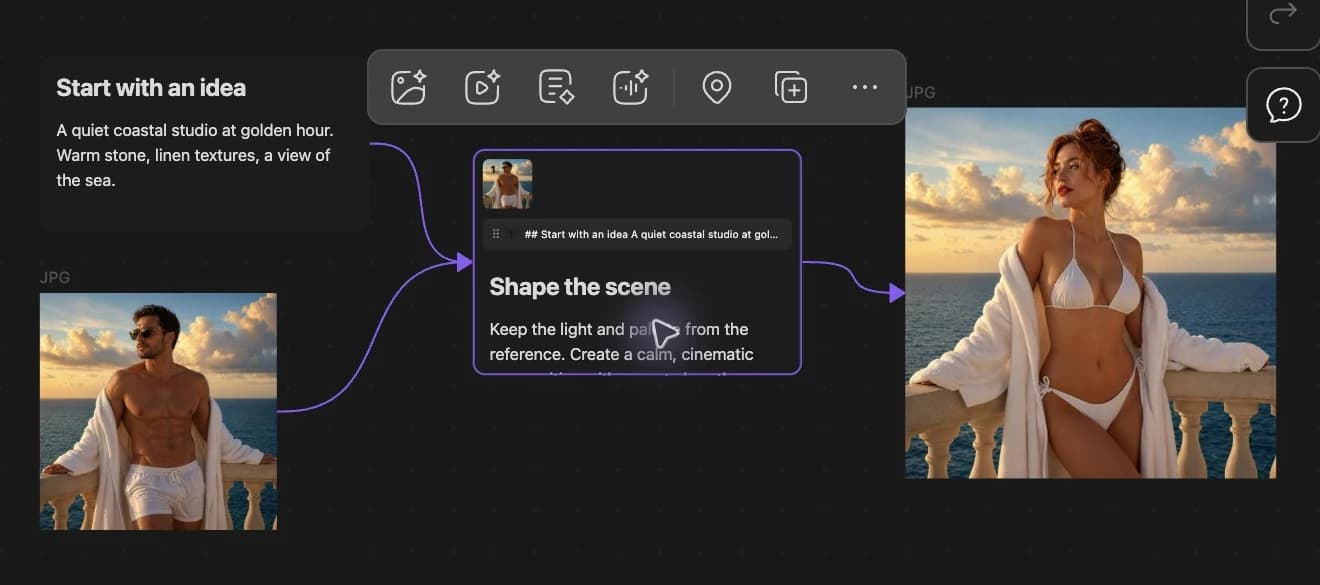
On text or note (.md) nodes
| Button | Action |
|---|---|
| Generate image | Open the image generate bar |
| Generate video | Open the video generate bar |
| Generate text | Open the text generate bar |
| Generate audio | Open the audio generate bar |
| Duplicate with connections | Copy the node and recreate its incoming edges. Only appears when the node has incoming arrows. |
| Mark | Toggle a purple highlight as a visual anchor |
Generate bar layout
When you click a generation button, a bar appears below the selection:
- Model — dropdown of enabled models with configured providers.
- Mode — dropdown when the model supports multiple modes. Common for video.
- Parameters — aspect ratio, duration, quality, voice, and other options. Each model defines its own set.
- Count —
x1throughx4for parallel runs from the same prompt. - Run — starts generation. Hover when disabled to read the tooltip reason.
Parameter choices are remembered at the node level first, then globally, then as model defaults.
During generation
Bragi creates a placeholder card beside the prompt with a shimmer animation. Most toolbar actions hide until generation finishes.
On failure
The placeholder turns red. An Error details button shows the provider message.
Output location
Generated files save under _bragi/assets/ in the same folder as your .canvas file.
Example:
File nodes on the canvas point to these paths.
Settings overview
Open Settings → Bragi Canvas:
- General — clean up unused generated files, import settings JSON, test temporary cloud storage.
- Mcp server — enable local MCP, set port (default 17775), optional access token.
- Providers — add and manage API keys; choose which models each provider powers.
- Models — enable, disable, and reorder Image, Video, Text, and Audio models.