References
How arrows feed prompts with text, images, video, audio, and PDFs.
References are how Bragi understands context beyond the text in your selected node.
An arrow that points into a prompt node means: use this as input for the prompt.
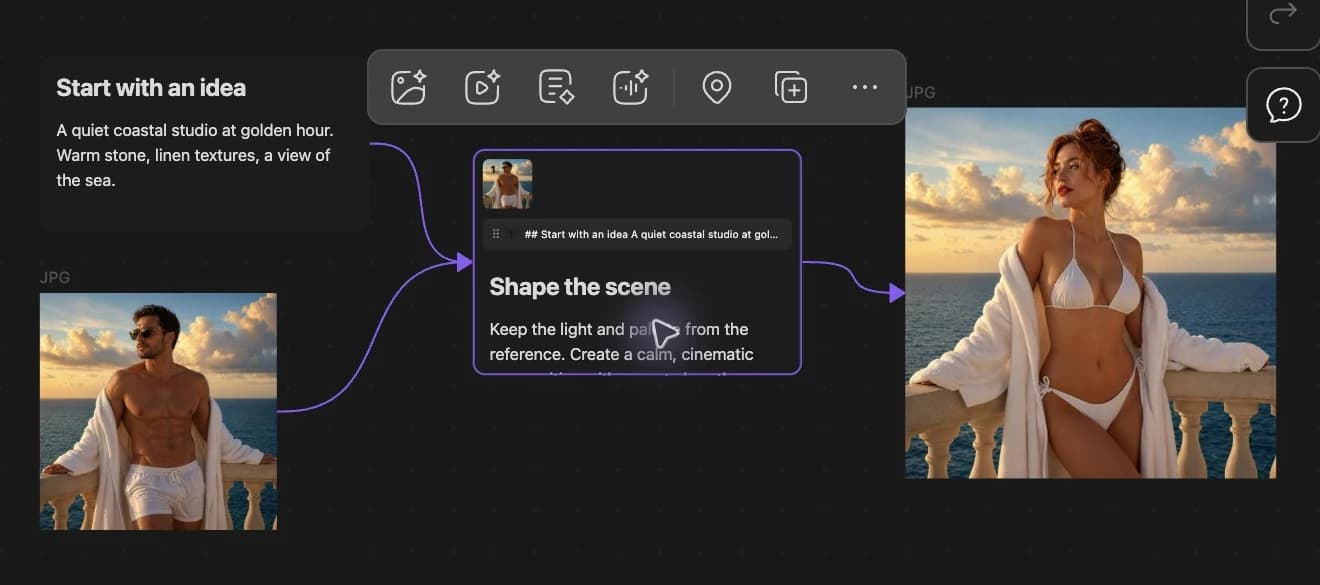
The rule
Only a directed arrow pointing into the selected node counts as upstream input.
| Arrow type | Counts as input? |
|---|---|
| Directed into the prompt (→) | Yes |
| Undirected (—) | No |
| Bidirectional (↔) | No |
If a reference seems ignored, check arrow direction first.
Upstream types
| Source on canvas | Becomes |
|---|---|
| Text card | Extra prompt text merged with the bar input |
.md note card | Note content read as prompt text |
| Image file (png, jpg, jpeg, webp, gif) | Image reference |
| Video file (mp4, mov, webm) | Video reference for supported video modes |
| Audio file (mp3, wav, flac, m4a, ogg, aac) | Audio reference for TTS clone, dubbing, or multimodal text |
| PDF file | PDF input for supported text models |
Prompt merge order
- Upstream text from connected nodes, respecting strip order.
- Anything you type in the generate bar.
If both exist, Bragi combines them.
Visual strips on the prompt node
When references are connected, strips appear inside the prompt node:
- Image thumbnails with order badges (①②③…).
- Text preview chips showing the first part of upstream text.
- Audio chips showing file name and duration.
Drag thumbnails or chips to reorder. Order affects generation.
Before an expensive run
Check these three things:
- Does the arrow point from the reference into the prompt?
- Is the prompt node selected, not the reference?
- Does the chosen model and mode support that reference type?