Agents and MCP
Optional local MCP server for Cursor, Codex, Claude Code, and other agents.
Bragi Canvas includes an optional local MCP server. MCP lets an AI agent use tools to inspect and control your active Obsidian canvas instead of only reading text.
The MCP server is disabled by default and listens on localhost only.
Before you start
In Obsidian:
- Install and enable Bragi Canvas.
- Open Settings → Bragi Canvas.
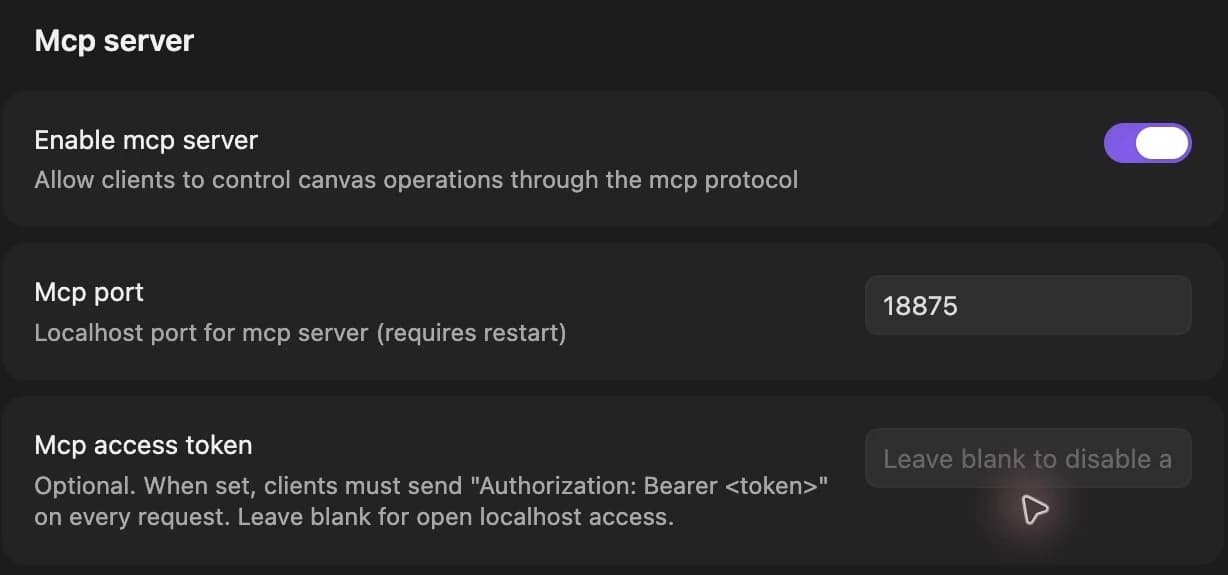
- Enable Enable mcp server.
- Keep a
.canvasfile open as the active tab. - Optionally set an Mcp access token. When set, clients must send
Authorization: Bearer <token>on every request.
Default MCP URL:
Change the port in settings if needed. Restart Obsidian after changing the port.
What agents can do
With MCP enabled, an agent can:
- List, create, update, and delete nodes.
- Connect and disconnect edges.
- Read the canvas and current selection.
- List configured models.
- Inspect upstream references for a node.
- Trigger generation on a node.
- List pending audio and video tasks, including tasks waiting for recovery.
- Batch-create nodes, batch-connect edges, and arrange nodes in a grid.
Tools exposed include: list_nodes, get_node, create_text_node, update_node, delete_node, connect_nodes, delete_edge, list_edges, get_selection, select_node, read_canvas, list_models, get_upstream, generate, list_pending_tasks, create_nodes_batch, connect_nodes_batch, update_nodes_batch, and arrange_in_grid.
Before generating, use get_upstream to check the connected references. Its image and audio lists follow the order shown on the prompt node, with each audio file listed once. After dragging audio chips into a new order, check the list again before writing numbered audio references in the prompt. The chosen model must support those references.
Kling 4.0
Plugin 1.45.0 adds an explicit keyframes mode for Kling 4.0 to the existing generate tool. Put a [Keyframes] block on the prompt card or a connected text card, and read get_upstream before writing numbered image references. Its first-frame and first-and-last-frame modes allow an empty prompt. See Video for the notation. Existing async task tools track generation as usual.
Codex setup
Add the MCP server:
If you set an MCP access token:
Install the Bragi Canvas skill:
Claude Code setup
Add the MCP server:
Install the skill folder from:
Smoke test
Ask the agent:
Expected behavior:
- The agent checks the active canvas.
- The agent lists image models backed by configured providers.
- If no canvas is open, it asks you to open one in Obsidian.
BreezeBlue reference audio
When list_models includes breeze-tts-2-multilingual, an agent can connect a voice-description text node to a script node and generate 1–3 audio candidates. The script stays separate from the description.
Call generate on the script node with modelId: "breeze-tts-2-multilingual", mode: "tts", and params: { preview_count: 3 }. This model uses Design automatically. Optional voiceDesignTextIndex selects a description when several upstream text nodes are connected.
The synchronous request's placeholder is replaced with separate audio file nodes. Inspect list_nodes and list_edges for all candidates, then connect the chosen audio to a video model that supports it. No voice ID or voice-save call is needed. list_models exposes voiceSources and voiceDesignOutput so agents can identify this behavior.
Wan Prime and Vidu
These capabilities are available in plugin 1.45.0 or later. Discover them with list_models before generating. For Wan 3.0, keep modelId: "wan-3.0" and select params: { variant: "prime" }. Omitted variant remains Standard.
Vidu uses modelId: "vidu-q4-preview". For prompt-free first-frame animation, connect exactly one image to an empty text node and call generate on that text node with mode: "first-frame". Image-ref requires a prompt, 1–15 images, and optionally up to three MP3 references. Connect media as canvas nodes; see Video for limits. Pass audio: "false" inside params for silent output.
When mode is omitted, Vidu selects first-frame for one image, or image-ref for multiple images or image plus audio. Other models retain their existing MCP mode defaults. Explicit mode selection takes precedence. Async placeholders, task polling, and recovery work as usual.
Seedance drafts
list_models advertises resolution: "draft" for Seedance 2.5 when BytePlus is active in plugin 1.44.0 or later, or SVRouter is active in plugin 1.46.0 or later. Use it only when the active provider's entry offers it. An agent can pass that value to the existing generate tool and track the normal async placeholder. Other controls and the tool's result shape stay the same.
Creating the final video is a UI action: keep the provider that created the draft active, select the completed draft node in Obsidian and click Generate 1080p. There is no additional MCP tool for this action. See Video for validity, billing, and error behavior.
Connection boundaries
Only enable MCP for local tools you trust. The server binds to 127.0.0.1 when enabled. Without a token, other local processes can also call it. If you configure a token, every client must supply it.
Related pages
Local command-line clients can connect without an Origin header. Browser requests are accepted only from the server's own origin; external origins and Origin: null are rejected. The Host must be a loopback address with the configured port.
POST requests must use Content-Type: application/json. The body limit is 64 MiB and the body-read timeout is 30 seconds. A rejected origin returns 403, a non-JSON body returns 415, an oversized body returns 413, and a read timeout returns 408. A missing or invalid configured token returns 401.
list_pending_tasks includes state, nextRetryAt, and lastError when available. To recover a task, fix the reported problem and use Resume checking in Obsidian. Do not call generate again to resume an existing task.